What Does Automating Scheduling Mean for a Small Business in 2026?
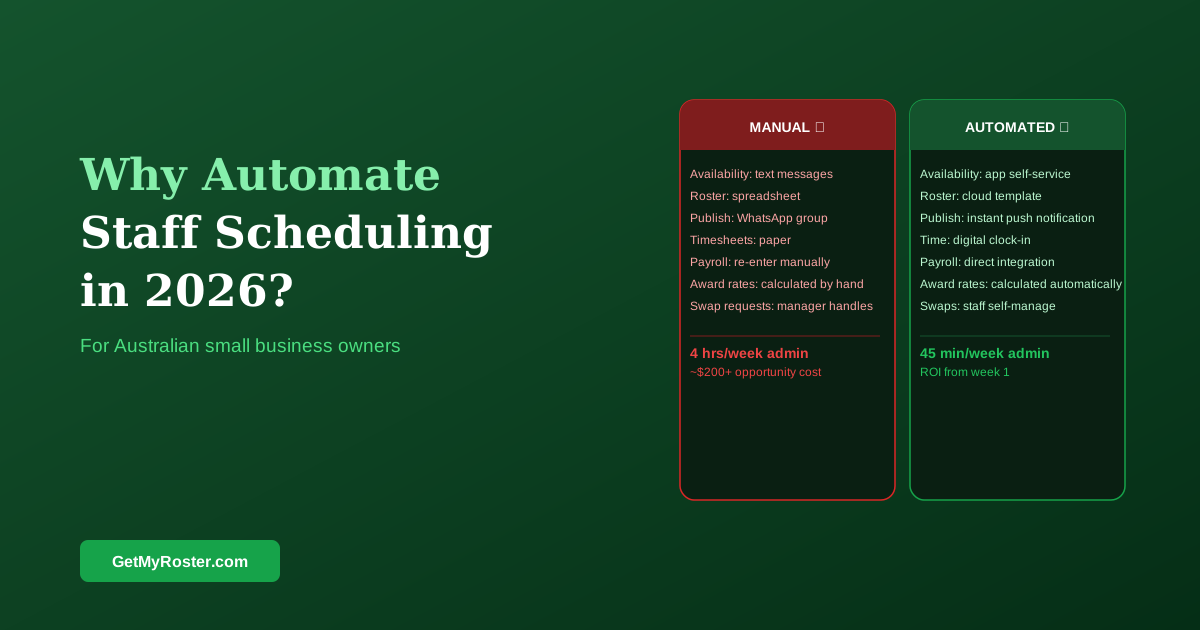
Automating scheduling for a small business means replacing three specific manual processes: individual availability chasing (staff submit via app), roster communication (published directly to staff phones), and timesheet transcription (hours flow to payroll without re-entry). The manager still makes every staffing decision — automation removes the admin around those decisions, not the decisions themselves. The time saving starts in the first roster cycle.
In 2026, the case for small business scheduling automation is stronger than it has ever been. Cloud-based platforms have made the technology affordable for teams of any size, Australian Award complexity makes manual compliance increasingly risky, and employee expectations for app-based roster access have risen to the point where paper and group-chat scheduling is a recruitment disadvantage. This article makes the case plainly.
The Three Manual Processes You're Wasting Time On
Most small business owners who are rostering manually spend time on three specific tasks: collecting availability (contacting staff individually or waiting for group chat responses), communicating the roster (posting it somewhere, printing it, or messaging it out), and transferring time records to payroll (copying hours from timesheets into a payroll system or spreadsheet). None of these tasks require human judgment — they are pure admin that software handles more accurately and faster. For a full cost analysis of these manual processes, see our guide on the hidden savings of digital rostering.
The Compliance Risk You're Carrying
Manual scheduling in Australia in 2026 means manually applying complex Modern Award provisions — casual loading, minimum engagements, penalty rates that vary by day and time, overtime thresholds. Getting these right consistently, across every shift, every week, without a system that automates the calculation, requires exceptional attention to detail. Most businesses that have been investigated by the Fair Work Ombudsman for underpayment weren't deliberately non-compliant — they were managing complexity without the tools to do it consistently. Scheduling software that includes Award interpretation eliminates the human error in that calculation.
What Employees Now Expect
Staff in retail, hospitality, and healthcare in 2026 expect to receive their roster on their phone, set their availability through an app, and request swaps without going through a manager for every step. Businesses that still use a whiteboard or group chat to communicate schedules are at a competitive disadvantage in the labour market — particularly for younger workers who have worked at competitors that use scheduling apps. This isn't an observation about technology preferences; it's an observation about staff retention and recruitment.
The ROI Is Immediate
At $3–$8 per employee per month, a 10-person team pays $30–$80 per month for scheduling software. If the platform saves the manager 3 hours per week — a conservative estimate — that's $240 per month at $80/hour opportunity cost. The ROI is positive from the first month, before counting payroll accuracy improvements, overtime reduction, or the retention benefit of a better scheduling experience. For first-time managers weighing when to make the switch, our first-time rostering survival guide covers the decision in detail.
Frequently Asked Questions
What does automating scheduling mean for a small business?
Replacing three manual processes: availability collection (staff submit via app), roster communication (published directly to staff phones), and timesheet transcription (hours flow to payroll without re-entry). The manager still makes every staffing decision — automation removes the admin around those decisions, not the decisions themselves.
Is scheduling automation cost-effective for a small team?
Yes. At $3–$8 per employee per month, a 10-person team pays $30–$80 per month. Time savings of 2–4 hours per week represent $120–$320 per month in opportunity cost at $80/hour. The ROI is positive from the first month in almost every case — before counting payroll accuracy improvements and overtime reduction.
When is the right time to switch from spreadsheets to scheduling software?
When you spend more than an hour per week on roster admin. For most businesses this is around 5–8 employees. Below 5, a spreadsheet may be adequate. Above 8, the coordination complexity — availability management, swap requests, payroll transcription — typically justifies the cost of dedicated software.
Does scheduling software work for businesses with seasonal demand?
Scheduling software is particularly valuable when demand is irregular, because it makes the cost of over- and under-staffing visible in real time. Seasonal businesses can maintain multiple roster templates for peak and off-peak periods. The demand visibility provided by scheduling software is more valuable when demand varies — not less.
Start Automating the Admin. Keep Making the Decisions.
GetMyRoster handles availability collection, roster publishing, Award-compliant pay calculations, and payroll integration — so your time goes to running the business, not managing the roster.
Start Free Trial