Why Do Roster Software Rollouts Fail and How Do You Prevent It?
Most rollouts fail not because the software is wrong but because the change management is inadequate. Staff need to understand why the change is happening, what it means for their daily experience, and how to use the new tool before they're asked to rely on it. Frame it as a benefit to them — not a system change for the business — and the adoption rate is dramatically higher.
Implementing new rostering software is a change management exercise as much as a technology one. The software might be excellent, but if it's introduced poorly — with inadequate communication, insufficient training, or no clear benefit visible to the staff using it — adoption will be slow, partial, and frustrating for everyone. This guide covers how to run a rollout that actually sticks.
Why Resistance Happens and What It Tells You
Staff resistance to new scheduling tools comes from three sources: habit (the current way is familiar, even when imperfect), uncertainty (what exactly does this require of me?), and past experience with changes that created more work than they saved. Identifying which is driving the resistance determines how you address it.
Habit-based resistance responds to demonstration: show staff the specific experience they'll have — receiving their roster notification on their phone, tapping to confirm a shift, requesting a swap without messaging the manager. Uncertainty-based resistance responds to clear, simple information. Past-experience resistance requires evidence: let an early adopter in the team share their experience in their own words.
The 4-Week Rollout Plan
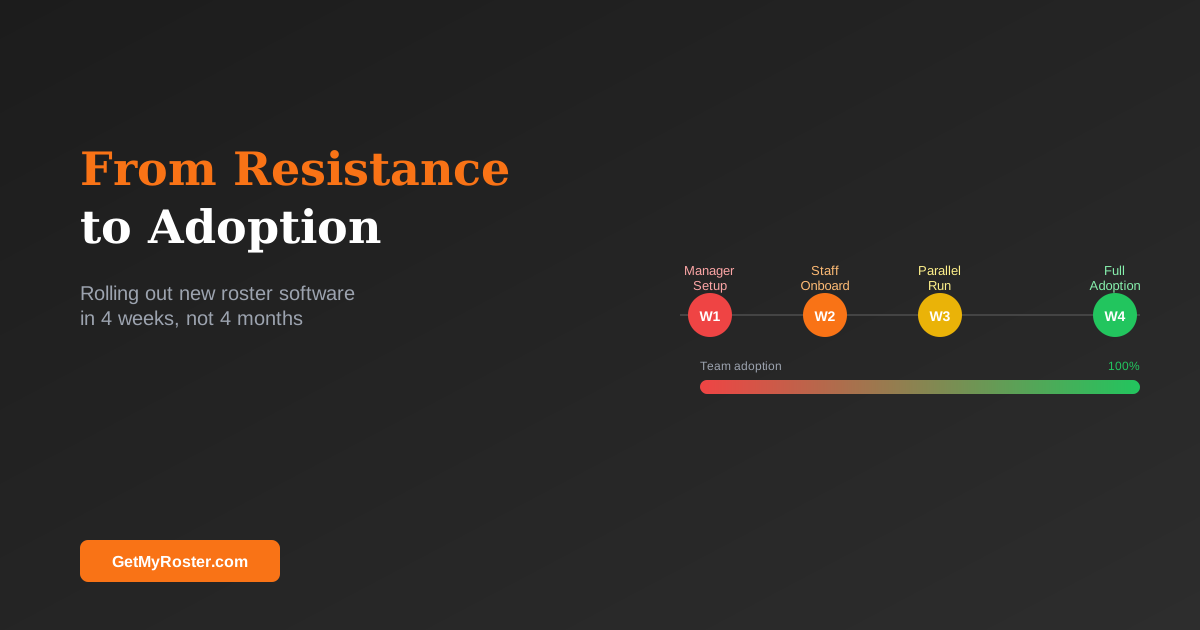
A structured four-week rollout prevents the most common failure modes:
- Week 1 — Manager setup: Create employee profiles, configure shift templates, test payroll integration. The manager should be completely familiar with the system before staff onboarding begins.
- Week 2 — Staff onboarding: Send app download instructions, run a brief team demonstration (5–10 minutes in a team meeting, not a written manual), and have staff set their availability. Confirm everyone has downloaded the app and can see the roster.
- Week 3 — Parallel run: Build and publish the roster through the new software. Keep the old method as a backup but make clear this is the last week it will exist. Collect feedback on anything that doesn't work as expected.
- Week 4 — Full adoption: Old system retired. Roster only published through the app. Follow up individually with any staff who haven't engaged with the platform.
Getting Buy-In from Sceptical Staff
The language of the rollout matters. "We're implementing new rostering software" positions the change as something happening to staff. "You'll be able to see your roster on your phone the moment it's published and request shift swaps without messaging me" positions it as something happening for staff. The latter gets buy-in; the former gets eye-rolls. For the broader case for scheduling automation, which gives you additional talking points, see why small businesses should automate scheduling.
What to Do When Adoption Stalls
Some staff will not engage with the new platform despite all efforts. Before escalating, diagnose the specific barrier: is it the smartphone (some staff use basic phones?), literacy (is the interface confusing?), language (are the notifications in a language they're less comfortable with?), or genuine resistance to any technology change? Each requires a different response. Most platforms offer alternative communication methods for staff who cannot use the app. For a broader guide to the tools that support team productivity beyond scheduling, see 5 essential tools for a hyper-productive team.
Frequently Asked Questions
Why do staff resist new scheduling software?
Resistance typically comes from habit (the current way is familiar), uncertainty (what does this require of me?), and past experience with poorly implemented changes. Understanding which is driving the resistance determines how you address it — demonstration, clear information, or peer endorsement from an early adopter.
How long does full adoption of rostering software take?
For teams of 15–30 people, full adoption — all staff using the app consistently — takes 2–4 weeks. Week one is manager setup. Week two is staff onboarding. Weeks three and four consolidate habits. Expect a small number of laggers; follow up individually rather than waiting for them to catch up on their own.
Should I run the old and new systems in parallel?
A one-week parallel run is advisable as a safety net. Beyond one week, parallel systems create confusion and slow adoption. Set a clear cut-off date and communicate it in advance so staff know when the transition is final.
What is the best way to get staff to use the app?
Make the app the only channel through which the roster is published after the transition date. If staff can still find the roster on the whiteboard, there is no incentive to use the app. Pair this with a brief live demonstration — not a written instruction sheet — during a team meeting.
A Roster Software Rollout That Takes 4 Weeks, Not 4 Months
GetMyRoster is designed for fast adoption — simple setup, intuitive mobile interface, and a team onboarding flow that gets staff using the app within the first week.
Start Free Trial