What Hidden Savings Does Digital Rostering Deliver for SMBs?
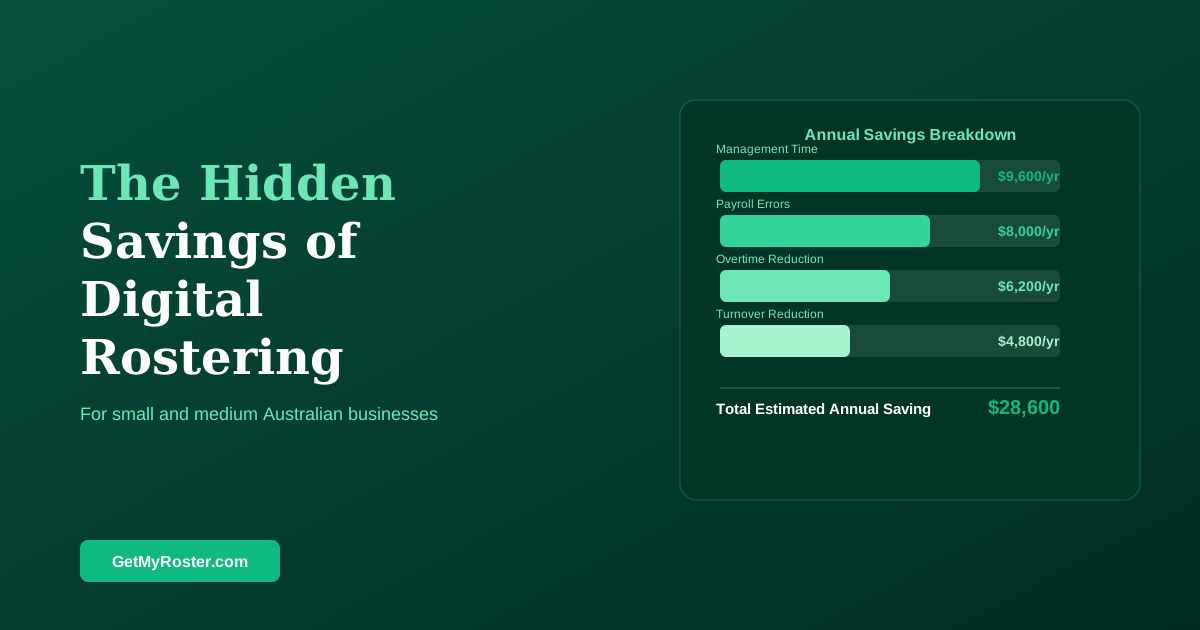
Digital rostering reduces management time by 2–4 hours per week, cuts payroll errors through direct integration with payroll systems, reduces overtime through early-warning alerts, and improves staff retention through better schedule communication. Most SMBs that switch from spreadsheets and group chats to digital rostering recover the software cost within the first month.
Small and medium business owners know that manual rostering takes time. What most don't quantify is how much time, what that time costs, and what other savings are hiding in the same problem. This guide makes those numbers explicit — because when you can see the full cost of the current way, the decision to change becomes obvious.
The True Cost of Manual Rostering
A typical SMB manager using spreadsheets and group chat spends 2.5–4 hours per week on roster-related admin: building the schedule, communicating it, managing swap requests, chasing availability confirmations, and correcting errors. At a conservative $60/hour opportunity cost for a business owner's time, that's $150–$240 per week, or $7,800–$12,480 per year — not counting payroll processing time.
Payroll errors are the second largest hidden cost. Businesses using paper timesheets experience an average transcription error rate of 2–3% of payroll. For a business with a $400,000 annual wage bill, that's $8,000–$12,000 per year in incorrect payments — some overpayments, some underpayments (with compliance implications). See also our guide on why SMBs should automate scheduling.
Where the Savings Come From
| Source | Manual Approach Cost | Digital Saving |
|---|---|---|
| Management time (roster admin) | $7,800–$12,480/yr | 75–80% reduction |
| Payroll transcription errors | 2–3% of wages | Near-zero with direct integration |
| Unplanned overtime | Typically 3–8% of wages | 5–15% reduction with alerts |
| Turnover from poor communication | $15,000–$25,000 per departure | Measurable reduction in turnover |
The Compliance Safety Net
Digital rostering creates an audit trail that manual systems don't. Every shift offered, accepted, worked, and amended is timestamped in the system. If a Fair Work compliance issue arises — and the Fair Work Ombudsman investigates hundreds of Australian SMBs annually — a digital record of scheduled versus actual hours, with timestamps, is far stronger evidence than handwritten timesheets.
The cost of a Fair Work investigation is not just the potential underpayment repayment — it's the management time consumed, the potential civil penalties, and in some cases the reputational damage of a named compliance finding. Digital records are a preventive investment. For the compliance basics that inform good rostering, see our scheduling law guide.
Choosing the Right Tool for Your SMB
The right digital rostering tool for most SMBs has four essentials: simple setup (live in under 2 hours, no implementation project), mobile-first design for both managers and staff, payroll integration (Xero, MYOB, or KeyPay), and transparent per-employee monthly pricing. Award interpretation — automatic penalty rate calculation — is the feature that generates the largest compliance protection for the smallest ongoing effort.
Frequently Asked Questions
What are the main hidden costs of manual rostering?
The main hidden costs are: management time (2–4 hours per week), payroll errors from manual transcription (averaging 2–3% of payroll), overtime that accumulates without early warning, compliance liability from inadequate record-keeping, and staff turnover attributable to poor scheduling communication.
How quickly do SMBs typically recover the cost of rostering software?
Most SMBs recover the cost within 4–8 weeks through management time savings alone. At $3–$8 per employee per month, a 15-person team pays $45–$120 per month — recovered in the first week of management time saved. Payroll accuracy and overtime improvements add compounding savings after that.
What integrations should an SMB look for in rostering software?
The most valuable integrations are payroll systems (Xero, MYOB, KeyPay) to eliminate manual timesheet entry, and accounting systems for labour cost tracking. Mobile app access for both managers and staff is essential — not optional. Award interpretation is a valuable secondary feature for businesses covered by Modern Awards.
Is digital rostering suitable for a business with fewer than 10 employees?
Yes. The per-employee cost is the same regardless of team size, and the time savings are proportionally just as significant. A 6-person team typically saves 2–3 hours of management time per week — often the owner's most valuable hours. The compliance record-keeping benefits apply equally to any size business.
See Exactly What Manual Rostering Is Costing You
GetMyRoster replaces the spreadsheet, the group chat, and the Sunday night roster panic — and connects directly to Xero, MYOB, and KeyPay so your hours flow to payroll without manual entry.
Start Free Trial