🎯 Quick Answer
An effective employee shift swap policy includes: (1) Clear eligibility rules (who can swap with whom), (2) Advance notice requirements (minimum 24-48 hours), (3) Manager approval process, (4) Qualification verification (swapping employee must be trained for the position), (5) Documentation requirements, and (6) Consequences for no-shows after approved swaps. Mobile rostering apps like GetMyRoster automate qualification checks, approval workflows, and notifications, reducing manager time spent on shift changes by 80% while giving employees the flexibility they value.
It's 5:47 AM on a Tuesday. Your phone buzzes with a text: "Hey boss, can Sarah cover my shift today? I'm really sick." You check the schedule—the shift starts in 90 minutes. Is Sarah trained for that position? Is she already scheduled elsewhere? Did she agree to this, or is your employee just hoping? You don't even have Sarah's phone number handy to confirm.
This scenario plays out thousands of times daily in restaurants, retail stores, healthcare facilities, and service businesses. Without a clear shift swap policy, you're stuck playing referee between employees, scrambling for coverage, and constantly worried about whether the right people are in the right positions.
A well-designed shift swap policy solves these problems. It gives employees the flexibility they need while protecting your business with clear rules, qualification checks, and accountability. This guide shows you exactly how to build a policy that works—plus the technology tools that make shift swapping seamless instead of stressful.
Why You Need a Formal Shift Swap Policy
Many businesses operate without written shift swap policies, relying instead on informal arrangements and manager discretion. This approach creates three major problems:
1. Inconsistency and Perceived Favoritism
When there are no written rules, approval becomes subjective. One manager allows swaps freely; another rarely approves them. Employee A gets approved for every swap request; Employee B feels like their requests are always denied. This inconsistency breeds resentment and claims of unfair treatment.
2. Service Quality and Safety Risks
Informal swaps often skip the crucial question: Is the replacement employee actually qualified for this position? A server swapping with a host creates service issues. A certified forklift operator swapping with someone uncertified creates safety violations. An RN swapping with an LPN may violate licensing requirements.
3. Manager Burnout from Constant Firefighting
Without clear procedures, every swap request becomes a mini-project: track down both employees to confirm, check qualifications, verify no conflicts exist, update the schedule, notify everyone affected. Multiply this by 5-10 requests per week, and managers spend hours on administrative tasks instead of leading their teams.
The Benefits of a Formal Policy:
- Clarity for everyone: Employees know exactly what's allowed and what isn't
- Consistent application: Same rules apply to all employees across all managers
- Protected service quality: Qualification checks ensure competent coverage
- Reduced manager workload: Clear process eliminates constant questions and negotiations
- Employee satisfaction: Flexibility for life's unexpected events without chaos
- Accountability: Everyone knows who's responsible for each shift
According to workforce management research, employees who feel they have schedule flexibility show 15% higher job satisfaction and 23% lower turnover rates. A formal shift swap policy provides that flexibility within a framework that protects business operations.
The 7 Essential Elements of a Shift Swap Policy
Every effective shift swap policy addresses these seven critical elements. Skip any of them, and you'll face confusion, disputes, or operational problems.
Element 1: Eligibility Requirements
Define who can participate in shift swaps. Common eligibility criteria include:
- Probation period completion: New employees must complete 30-90 days before swapping shifts
- Good standing: Employees with recent disciplinary actions may be temporarily ineligible
- Position qualification: Employees can only swap into positions they're trained and certified to perform
- Same classification: Full-time employees swap with full-time, casual with casual (to maintain budget and benefits compliance)
Element 2: Advance Notice Requirements
Specify minimum notice periods for swap requests. Standard timeframes:
- Regular swaps: 24-48 hours minimum advance notice
- Emergency swaps: Same-day consideration at manager discretion for illness, family emergency, etc.
- Peak period blackouts: Higher notice requirements (72+ hours) during busy seasons or major events
Element 3: Approval Authority
Clearly state who approves swap requests:
- Direct supervisor/manager: Most common approach for daily operations
- Shift leads: May approve routine swaps with manager oversight
- Automatic approval: For certain low-risk swaps meeting all criteria (qualification verified, no conflicts, adequate notice)
- Senior manager approval: Required for swaps during peak periods or involving supervisory positions
Important: Specify that manager approval is required for all swaps. Employees arranging private swaps without notification creates accountability nightmares when someone no-shows.
Element 4: Qualification Matching
This is the most critical safety and quality element. The policy must state:
- Replacement employees must be trained and qualified for the specific position
- Certifications and licenses must be current (food safety, RSAN, CPR, etc.)
- System must verify qualifications before swap can be approved
- Cross-trained employees must have demonstrated competency, not just completed basic training
For example, in a restaurant, a host cannot swap into a bartender shift without bartending certification. In healthcare, an LPN cannot swap into an RN shift regardless of experience.
Element 5: Documentation Process
Specify how swaps are requested and recorded:
- Request method: Mobile app, email, written form (never just verbal or text message)
- Required information: Original employee, replacement employee, date, shift time, reason (optional)
- Approval documentation: Manager must approve in writing (digital or physical)
- Schedule updates: Approved swaps must be reflected in the official schedule immediately
- Notification: All affected parties receive confirmation (both employees, manager, potentially other team members)
Element 6: Limits on Swap Frequency
Prevent abuse by setting reasonable limits:
- Monthly cap: 2-4 non-emergency swaps per employee per month
- Consecutive shift restrictions: Can't swap away all shifts in a particular week or eliminate all weekend work
- Pattern monitoring: Managers review swap patterns to identify scheduling mismatches or second job conflicts
If an employee constantly requests swaps, it signals either poor schedule fit or personal issues that need addressing. The swap policy shouldn't mask fundamental scheduling problems.
Element 7: Accountability for No-Shows
This is where many policies fail. Crystal-clear accountability rules:
- Primary responsibility: Once a swap is approved, the replacement employee owns that shift completely
- No-show consequences: Follow normal disciplinary procedures (the original employee is not responsible)
- Last-minute cancellations: If replacement employee cancels approved swap, responsibility may revert to original employee with notice
- Documentation importance: Without documented approval, original employee remains responsible
Sample Shift Swap Policy Framework
| Policy Element | Our Standard |
|---|---|
| Minimum Advance Notice | 48 hours (24 hours for emergencies) |
| Approval Required | Yes - Direct manager approval mandatory |
| Qualification Check | Automatic verification via system |
| Monthly Swap Limit | 3 regular swaps + unlimited emergency |
| Peak Period Restrictions | 72-hour notice during holidays/events |
| Accountability | Replacement employee fully responsible |
| Request Method | Mobile app with automatic notifications |
How to Implement Shift Swaps Without Manager Burnout
The best policy in the world fails if implementation creates excessive work for managers. The solution is combining clear policies with technology that automates the tedious parts.
The Old Way: Manual Swap Management
Employee texts manager → Manager calls replacement to confirm → Manager checks schedule for conflicts → Manager verifies qualification by memory or checking files → Manager manually updates schedule → Manager texts both employees to confirm → Manager hopes everyone shows up. Time invested: 15-20 minutes per swap.
The Modern Way: Mobile Self-Service with Smart Guardrails
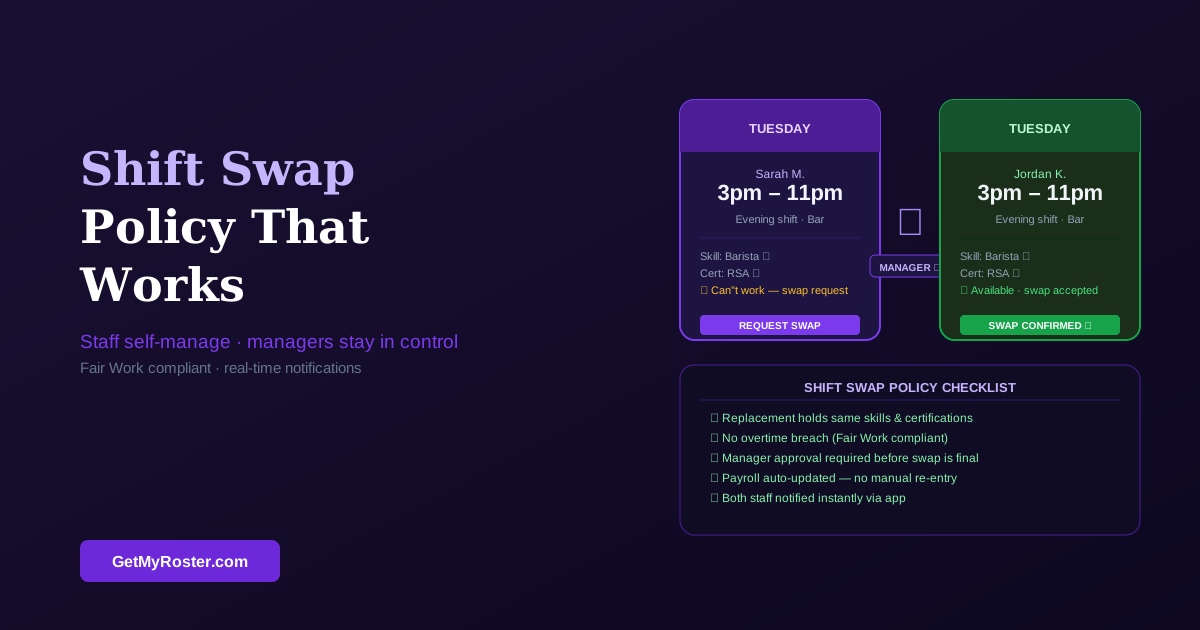
Employee opens app → Selects shift to swap → System shows only qualified employees → Replacement accepts in app → Manager receives notification with all details → Manager approves with one tap → System updates schedule automatically → Both employees receive instant confirmation. Time invested: 30 seconds per swap.
How Mobile Rostering Apps Streamline Swaps:
- Automatic qualification filtering: System only shows employees trained for the specific position
- Conflict detection: Prevents swaps that would create double-bookings or overtime
- One-tap approvals: Managers see all relevant details and approve/deny instantly
- Real-time notifications: Push notifications and SMS keep everyone informed
- Complete audit trail: Every swap request, approval, and change is documented automatically
- Schedule sync: Approved swaps update the schedule immediately across all devices
When employees use GetMyRoster's mobile app to request shift swaps, the system automatically verifies they're swapping with someone qualified for the position. Managers receive a notification showing the request with all details—who, when, why, and confirmation that the replacement is certified. Approval takes a single tap, and both employees receive instant confirmation. This reduces manager time spent on swap administration by 70-80% while actually improving oversight and accountability.
Common Shift Swap Scenarios and How to Handle Them
Real-world situations test your policy. Here's how to handle the most common swap scenarios:
Scenario 1: Last-Minute Illness
Situation: Employee wakes up sick 2 hours before their shift and texts asking for coverage.
Policy Application:
- Classify as emergency swap (24-hour notice waived)
- Employee must still follow proper request procedure (app or call, not just text)
- Manager can solicit coverage from qualified staff if employee hasn't found replacement
- Document the swap through official channels even though last-minute
- If no qualified replacement available, position remains unfilled (employee responsible for sick day)
Scenario 2: School Exam or Important Appointment
Situation: Student employee requests swap 5 days in advance for exam day.
Policy Application:
- Meets advance notice requirement—should be approved if replacement is qualified
- Counts toward employee's monthly swap limit (non-emergency)
- Perfect scenario for mobile self-service—employee finds replacement independently
- Manager simply verifies qualification and approves
- Encourage employee to provide more notice in future (allows more replacement options)
Scenario 3: Family Emergency
Situation: Employee's parent is hospitalized; they need to travel immediately and miss 3 scheduled shifts.
Policy Application:
- Classify as emergency—unlimited emergency swaps allowed
- Manager takes more active role in finding coverage given employee's stress
- May require temporary schedule adjustment rather than individual swaps
- Consider whether unpaid leave or other accommodation is more appropriate than swaps
- Document situation for HR/payroll purposes
Scenario 4: Second Job Conflict
Situation: Employee frequently requests swaps because their second job schedule conflicts with your schedule.
Policy Application:
- First occurrence: Approve if within monthly limit
- Pattern develops: Schedule conversation about availability and scheduling expectations
- Ongoing pattern: This isn't a swap issue—it's a scheduling fit issue
- Resolution: Either adjust employee's regular schedule to accommodate known conflicts, or employee must choose which job takes priority
- Swaps are for exceptions, not regular scheduling workarounds
Scenario 5: Personal Preference ("I don't want to work Saturday")
Situation: Employee regularly tries to swap Saturday shifts because they prefer not to work weekends.
Policy Application:
- Approve individual requests if within policy limits
- Monitor for patterns—if employee swaps every Saturday, address in next scheduling cycle
- Weekend availability should be established during hiring and scheduling, not managed through constant swaps
- If all Saturdays are swapped, update employee's availability formally and adjust future scheduling
- Be fair—if one employee never works Saturdays via swaps, others may feel burdened
Setting Boundaries: When to Say No to Shift Swaps
While shift swap policies should provide flexibility, some requests must be declined to protect business operations and fairness.
Valid Reasons to Deny a Shift Swap:
1. Unqualified Replacement
If the replacement employee isn't trained or certified for the position, the swap cannot be approved regardless of notice or circumstances. Safety and service quality are non-negotiable. Suggest the employee find a different qualified replacement.
2. Excessive Swap Frequency
When an employee exceeds monthly swap limits (outside emergencies), deny additional requests. This prevents abuse and signals a need to review their regular schedule for better alignment with availability.
3. Peak Period or Blackout Dates
Many businesses designate peak periods when swaps are restricted or prohibited—Black Friday for retail, Mother's Day for restaurants, year-end for accounting firms. These blackouts should be clearly communicated well in advance.
4. Creates Scheduling Conflicts or Overtime
If approving the swap would put the replacement employee into overtime, create double-booking, violate rest period requirements, or otherwise compromise schedule integrity, the swap must be denied. Suggest alternative dates or different replacement employees.
5. Insufficient Notice (Non-Emergency)
Swaps requested below your minimum notice requirement can be denied unless classified as emergency situations. Consistent enforcement teaches employees to plan ahead and prevents last-minute chaos.
6. Performance or Reliability Concerns
Employees on performance improvement plans or with recent attendance issues may temporarily lose swap privileges. This should be clearly documented as part of the performance management process, not applied arbitrarily.
7. Suspicious Patterns
If swap requests seem designed to manipulate the system—swapping to work alongside friends, avoiding specific managers, circumventing overtime rules—investigate before approving. Swaps should solve legitimate scheduling conflicts, not game the system.
How to Deny Professionally:
- Explain the specific policy violation clearly
- Suggest alternatives if possible (different replacement, different date)
- Be consistent—if you deny Employee A for a reason, Employee B gets denied for the same reason
- Document the denial and reason in case of future disputes
- If denying reveals a pattern, schedule a private conversation about the underlying issue
Technology Solutions for Seamless Shift Swapping
The difference between shift swap policies that work and policies that frustrate everyone often comes down to technology implementation.
The Text Message Trap
Many businesses allow shift swaps via text messages or group chats. This creates serious problems:
- No documentation: "I never agreed to that swap" disputes have no resolution
- No qualification checking: Unqualified replacements slip through regularly
- Schedule desync: Approved swaps never make it to the official schedule
- Manager exclusion: Employees arrange swaps without manager knowledge or approval
- Notification failures: Someone doesn't see the message chain and misses their shift
Why Mobile Apps Transform Shift Swapping
Purpose-built rostering apps solve all these problems through structured workflows:
1. Employee Self-Service
Employees open the app, select the shift they can't work, and see a list of qualified teammates who could potentially cover. The system automatically filters based on position qualifications, availability, and existing schedule to show only viable options.
2. Automated Qualification Verification
Each employee's profile contains their certifications, training completions, and position qualifications. The system only allows swaps between employees qualified for the specific position—a server can't swap with a host, a forklift operator can't swap with a general warehouse worker.
3. Streamlined Manager Approval
Managers receive push notifications when swap requests come in. The notification includes all relevant details: who's swapping with whom, for which shift, whether qualifications are verified, and if any conflicts exist. Approval or denial is a single tap with optional comments.
4. Automatic Schedule Updates
Once approved, the swap updates the official schedule immediately. Both employees see the change reflected in their personal schedules. Other team members viewing the schedule see the correct names. Timesheets and payroll reflect the actual worked shifts automatically.
5. Complete Audit Trail
Every swap request, approval, denial, and notification is logged with timestamps. If there's ever a dispute about who was scheduled or whether a swap was approved, complete documentation exists. This protects both the business and employees.
6. Real-Time Notifications
Push notifications and SMS keep everyone informed at each step. Employee requests swap → Potential replacement receives notification → Manager receives approval request → Approval triggers confirmation to both employees. No one can claim they "didn't know."
GetMyRoster's shift swap feature includes all these capabilities plus intelligent recommendations—when an employee needs coverage, the system can suggest the most appropriate replacements based on skills, availability, location, and past swap history. This makes finding qualified coverage faster and reduces the burden on both employees and managers.
Streamline Shift Swaps Today
Stop juggling text messages and manual schedule changes. GetMyRoster's mobile shift swap system handles qualification verification, approvals, and notifications automatically—giving your team flexibility without the administrative headache.
Start Free Trial →✅ FREE forever (up to 5 users) | ✅ Premium $1/user/month | ✅ Setup in 15 minutes
Frequently Asked Questions
What should be included in a shift swap policy?
A comprehensive shift swap policy should include: eligibility requirements (who can swap), advance notice period (typically 24-48 hours), manager approval process, qualification verification requirements, documentation procedures, limits on swap frequency, and accountability measures for no-shows after approved swaps. The policy should be written clearly and shared with all employees during onboarding.
How much advance notice should be required for shift swaps?
Most businesses require 24-48 hours advance notice for shift swaps to allow time for manager approval and schedule adjustments. Emergency situations may warrant exceptions with manager discretion. Some industries with complex scheduling (like healthcare) may require 72 hours or more, while retail and hospitality often work with 24-hour minimums. The key is balancing employee flexibility with operational planning needs.
Should managers approve every shift swap?
Yes, managers should approve every shift swap to ensure the replacement employee is qualified, the swap doesn't create scheduling conflicts or overtime, and business needs are still met. However, approval can be streamlined through mobile apps that automatically verify qualifications and flag issues, allowing managers to approve most swaps in seconds rather than investigating each request manually. This maintains oversight without creating administrative burden.
What happens if an employee doesn't show up for a swapped shift?
When an employee no-shows a swapped shift, the employee who accepted the swap (not the original employee) is held accountable. Clear policies should state that accepting a shift swap means accepting full responsibility for that shift. Consequences follow normal no-show procedures: verbal warning, written warning, suspension, or termination depending on severity and frequency. This is why documented approval is critical—it establishes clear accountability.
How many shift swaps should employees be allowed per month?
Most businesses allow 2-4 shift swaps per employee per month for non-emergency situations. This provides flexibility for appointments and personal needs while preventing abuse of the system. Unlimited swaps can indicate scheduling issues, poor employee fit, or second job conflicts. Track swap frequency to identify patterns that need addressing. Emergency situations (illness, family emergency) typically don't count toward monthly limits.
Can employees swap shifts without manager approval?
No, employees should never swap shifts without manager approval. Unapproved swaps can result in unqualified staff working positions, overtime violations, scheduling conflicts, and compliance issues. Even if two employees agree privately, the swap must go through your approval process to verify qualifications, prevent conflicts, and maintain accountability. Make this clear in your policy and enforce it consistently.
What technology makes shift swapping easier to manage?
Mobile rostering apps streamline shift swapping through employee self-service (staff can request swaps from their phones), automated qualification verification (system checks if replacement is trained), manager approval workflows (approve/deny with one tap), real-time notifications (all parties notified instantly), and audit trails (complete record for compliance). This reduces manager time spent on swap requests by 70-80% while actually improving oversight compared to manual text-based systems.
Conclusion: Empower Employees While Protecting Your Business
A well-designed shift swap policy isn't about restriction—it's about creating structure that enables flexibility.
When employees know exactly how to request swaps, what qualifications are needed, and how quickly they'll get approval, they can manage their own schedule conflicts confidently. When managers have automated tools that verify qualifications and flag issues, they can approve swaps in seconds instead of spending hours investigating each request.
The seven essential elements covered in this guide—eligibility, notice requirements, approval process, qualification verification, documentation, frequency limits, and accountability—create a framework that works. Combined with mobile technology that automates the tedious parts, you get the best of both worlds: employee flexibility and operational control.
Implementation Action Steps:
- Draft your policy using the seven elements framework
- Review with your management team and legal counsel if needed
- Implement mobile technology to automate qualification checks and approvals
- Train all employees on the policy during a team meeting
- Monitor swap patterns for the first 30 days and adjust policy if needed
- Celebrate success—measure manager time savings and employee satisfaction improvements
Most businesses implementing formal swap policies report dramatic improvements: 70-80% reduction in manager time spent on shift coverage, 40% fewer schedule-related conflicts, and measurable increases in employee satisfaction scores. The clarity alone eliminates most frustration.
Give Your Team Scheduling Flexibility They'll Love
GetMyRoster's mobile shift swap system puts employees in control of their schedules while giving you complete oversight through automated qualification checks, one-tap approvals, and real-time notifications. Your policy becomes effortless to enforce.
Try GetMyRoster Free →✅ FREE forever (up to 5 users) | ✅ Premium just $1/user/month | ✅ Full mobile access included